essay on programming languages, computer science, information techonlogies and all.

Wednesday, July 6, 2022

Cross-compile Armv7 from x86_64 using docker

Cross compiling sounds like a big water difficult to cross. Of course it asks a lot of knowledge but at the deep down, it is just another way of compiling and linking. And in here I am trying to show it by cross-compiling raspberrypi target from ubuntu x86_64 machine.

First, you need toolchain - arm gnu toolchain. I used 9.2 as it happended to be the version I used on work.

Second, part of target file system - /usr and /lib. For raspberry pi 32bit, download raspberry pi OS lite at here. Then extract /usr and /lib only.

With these two, we can make docker image for the build. Build needs x86_64 tools. And cross-compiler tool-chain - gcc-arm-xxx-x86_64-arm-xxx. And target root of raspbian os.

# Dockerfile
FROM  ubuntu:20.04

RUN useradd -s /bin/bash -u 1000 docker_user && \
    apt-get update && \
    apt-get install -y \
    gcc g++ cmake git ninja-build lcov bison flex curl python3 fakeroot libpcre3-dev libcurl4-openssl-dev libxml2-dev \
    cppcheck clang-tools clang-format clang-tidy
RUN apt-get install -y python3-pip 

# https://developer.arm.com/downloads/-/gnu-a
# AArch32 target with hard float (arm-none-linux-gnueabih, )
ADD gcc-arm-9.2-2019.12-x86_64-arm-none-linux-gnueabihf.tar.xz /opt

# SYSROOT from rapsbian buster armhf - usr, lib only
ADD raspios-buster-armhf-lite.usrlib.tar.gz /opt/raspios-buster-armhf-lite
RUN ln -s /opt/raspios-buster-armhf-lite/lib/arm-linux-gnueabihf/ /lib/arm-linux-gnueabihf

... snip ...


Third, we needs cmake cross-compiling toolchain file. Below cmake defines the cross-compiling by specifying compiler - gcc-arm-xxx - and include and lib path at /opt/raspios-xxx. You may wonders why is there no CMAKE_SYSROOT, CMAKE_FIND_ROOT_PATH. I found those generate number of error that ask other changes which seems to be too obscure to pursue. And I think it is succinct to tell the tool-chain where to look at to compile and link instead of using those magic words.

# toolchain_raspberrypi_gcc9.cmake

set(CMAKE_SYSTEM_NAME Linux)
set(CMAKE_SYSTEM_VERSION arm)
set(CMAKE_SYSTEM_PROCESSOR arm-linux-gnueabihf)
set(CMAKE_C_COMPILER /opt/gcc-arm-9.2-2019.12-x86_64-arm-none-linux-gnueabihf/bin/arm-none-linux-gnueabihf-gcc)
set(CMAKE_CXX_COMPILER /opt/gcc-arm-9.2-2019.12-x86_64-arm-none-linux-gnueabihf/bin/arm-none-linux-gnueabihf-g++)

set(CMAKE_EXE_LINKER_FLAGS "${CMAKE_EXE_LINKER_FLAGS} -L/opt/raspios-buster-armhf-lite/usr")
set(CMAKE_EXE_LINKER_FLAGS "${CMAKE_EXE_LINKER_FLAGS} -L/opt/raspios-buster-armhf-lite/usr/lib")
set(CMAKE_EXE_LINKER_FLAGS "${CMAKE_EXE_LINKER_FLAGS} -L/opt/raspios-buster-armhf-lite/usr/lib/arm-linux-gnueabihf")

include_directories(BEFORE 
    /opt/raspios-buster-armhf-lite/usr/include
    /opt/raspios-buster-armhf-lite/usr/include/arm-linux-gnueabihf


With above cmake toolchain file, we can define remainging part of docker that prepares google unittest and google benchmark.

# Dockerfile
...
ADD toolchain_raspberrypi_gcc9.cmake .

RUN git clone https://github.com/google/googletest.git --depth 1 --branch release-1.11.0 &&\
    cd googletest &&\
    cmake -S . -B ./build_x86_64 &&\
    cmake --build ./build_x86_64 &&\
    cmake --install ./build_x86_64 &&\
    cmake -S . -B ./build_arm -DCMAKE_TOOLCHAIN_FILE=../toolchain_raspberrypi_gcc9.cmake &&\
    cmake --build ./build_arm &&\
    cmake --install ./build_arm --prefix /opt/raspios-buster-armhf-lite/usr/ &&\
    cd ../ &&\
    rm -rf googletest

ADD CMakeLists.benchmark.txt .

RUN git clone https://github.com/google/benchmark.git --depth 1 --branch v1.6.1 && \ 
    cd benchmark &&\
    mv ../CMakeLists.benchmark.txt ./CMakeLists.txt &&\
    cmake -S . -B ./build_x86_64 -DCMAKE_BUILD_TYPE=Release -DBENCHMARK_ENABLE_GTEST_TESTS=0&&\
    cmake --build ./build_x86_64 --config Release &&\
    cmake --install ./build_x86_64 &&\
    cmake -S . -B ./build_arm -DCMAKE_BUILD_TYPE=Release -DBENCHMARK_ENABLE_GTEST_TESTS=0 -DCMAKE_TOOLCHAIN_FILE=../toolchain_raspberrypi_gcc9.cmake &&\
    cmake --build ./build_arm &&\
    cmake --install ./build_arm --prefix /opt/raspios-buster-armhf-lite/usr/ &&\
    cd ../ &&\
    rm -rf benchmark


After you generate docker image, you can go in the image, and make the host build and cross-compile build.

$ docker run --rm -it -v "$PWD":/du -w /du -u 0 samplecpp_build:0.1

/du# rm -rf ./build_x86_64
/du# cmake -S . -B ./build_x86_64
/du# cmake --build ./build_x86_64

/du# rm -rf ./build_arm
/du# cmake -S . -B ./build_arm -DCMAKE_TOOLCHAIN_FILE=../toolchain_raspberrypi_gcc9.cmake
/du# cmake --build ./build_arm


Cross-compiling means you specify compiler and include and lib path. And that is all.

You can find the code at my gitlab project samplecpp

Sunday, March 27, 2022

Annotated Verilog code for AXI-Stream FIFO interface

At Zynq, there is AXI-Stream FIFO to send/receive data between Processor and FPGA. It has two separate FIFOs - one for transmitting data to FPGA and receiving from FPGA. Here I will explain verilog code that can interface the FIFO with annotation.

First the module named decoder needs ports definitions. FIFO TX ports will be received by RX ports - rx_data, rx_valid, rx_ready. You can define special property - ( * X_INTERFACE_INFO ... *) - to group related ports which allows you to connect group ports - AXI_STR_TXD to RX. And TX to AXI_STR_RXD.  


In here, the FIFO data is treated as instruction. And FSM is implemented with FETCH-LOAD-(TX)-DONE cycle. 


When the module get reset_n - active low reset, the FSM get initialized. It can receive data from TX FIFO but no data to send to RX FIFO. 


At FETCH, when TX FIFO is 1, read rx_data.   


At LOAD, if instruction is CMD_WRITE, turn on/off led. If CMD_READ, prepare tx_data for send to TX FIFO 


At TX, send tx_data.  At DONE, we are ready to receive but nothing to send.


For the complete code, refer below.


Sunday, February 6, 2022

Blocking vs non-blocking assignment on sequential logic

Made counter that hold 1 clock at every 4 clock. First with blocking assignment


`timescale 1ns / 1ps
module ride_edge (
        input wire clk,resetn,
        output wire hold_p
    );
    
    reg hold;
    reg [1:0] count;
    
    assign hold_p = hold;
    
    always @(posedge clk or negedge resetn) begin
        if (!resetn) begin
            hold = 0;
            count = 0;        
        end
        else begin         
            if ( count == 0 ) hold = 1;    
            else if ( hold == 1 ) hold = 0;
            
            count = count + 1;
        end    
    end
    
endmodule


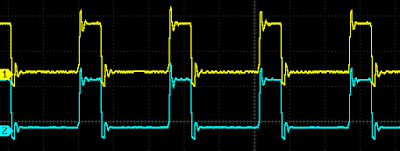
Then probe with oscilloscope.


Then made same code with non-blocking assignment like below.

`timescale 1ns / 1ps
module ride_edge_nonblocking (
        input wire clk,resetn,
        output wire hold_p 
    );
    
    reg hold;
    reg [1:0] count;
    
    assign hold_p = hold;
    
    always @(posedge clk or negedge resetn) begin
        if (!resetn) begin
            hold = 0;
            count = 0;        
        end
        else begin         
            if ( count == 0 ) hold <= 1;    
            else if ( hold == 1 ) hold <= 0;
            
            count <= count + 1;
        end    
    end    
endmodule


Here is Vivado diagram. The FCLK_CLK0 is 100MHz, xslice_1 pick Din[4] make 3.125MHz clock ( = 100MHz/32 ).


Then probe both hold_p.


Puzzled. I expected that non-blocking will be delayed 1 clock. No wonder as schematic shows exactly same nets generated.


But why no difference between blocking and non-blocking assignment ?  I guess that when the design involves a register then assignment type doesn't matter as the register will be used in same manner. It seems Vivado synthesis reads between lines.   

Then once you put a register in a design, same sequential logic will be generated which means '<=' will be used on every '='. Then better use '<=' on Verilog to avoid confusion ?  

Sequential logic needs register. It seems to me that '<=' is the only choice left. 
 

Wednesday, July 7, 2021

Finding planar rigid tranformation - linearized and weighted least squares

Rigid Transformation

A point P in the world can be expressed as Body coordinate as well as World coordinates, and the relationship between the two are rigid transformation - rotation and translation - like below.


Refer Wiki - Kinematics : Matrix representation

Image resolution and dimension

A point at an image can be expressed on world coordinates using Image resolution - i.e. mm / pixel - and dimension. At below, resolution is r. W is width and H is Height. Point at center (0,0) will be (320,240) of 640x480 image.


Geometric Model

For example, there is a pixel point (P) on a camera ( C ), that is offseted ( CO ) and assmebled to a machine (W).


And the machine has a stage (S) and it is moved by motor (M) and the stage has a point.


Then any point that camera see can be matched to a point on the stage.


Least square method on a linearized transformation matrix

If we know all other transformation except camera offset, then we can rearrange above equation like below for an i-th point.


The unknown CO transformation matrix can be linearized in assumption that the angle is small.


Then the equation can be rearranged putting the unknown X on right. Then the unknown can be solved by matrix inversion. Refer Wiki - Least Square : Linear least squares


Weighted least square method

If there is an uncertainty on each measurment of pixel point, the uncertainty can be put as weight (W) on each pixel point.


Then the equation can be rearranged for the unknown X. Note that element of X changed sign for convenience.


Monday, June 28, 2021

Continuous Integration of .NET Application using Azure DevOps

Are you still building exe in your local PC ?

Or maintain a dedicated PC that goes power-cycle at a stormy day or goes dead when HDD break down ? Aren't you tired of maintaining those build PCs ? Here is a story that can put those worries to history - only for .NET application using Azure DevOps now.

Cloud will build like local

Here,I want to make the build process runnable in the local PC as well as in the cloud - Azure DevOps - so that you can verify your change locally and you push the changes and know that the cloud will build your code in same manner. Then, once you fixed something on your local PC, you are just one push away to finish. Now if you sold, be patient and try to follow below.

Create Azure DevOps project

First, go to Azure DevOps and create a new project
Then clone the repository to your local PC. Or just clone template project

Directroy structure

Now you will populate the workspace with below directories. Or just copy and paste template project.

    /build         : contains build batch, project    
    /src   
       /bin        : generated dll, exe, pdb goes here
       /packages   : dependent component such as NUnit goes here
       /Foo        : various VS solutions
       /Bar
       ...

Local build

In local, you can open *.sln file at IDE and code and debug and build. Then you will open a command prompt and run build processs that will goes through all the solutions and make sure nothing break down by your change.

To make the process as easy as double-click an icon, there is Build command-line icon ath the build folder. When double click the icon, msbuild will be executed to build the whole process. Try to follow those arrows at below.


Your aim is to see below 'Build succeded.' like below.

Install packages

NuGet can put referenced dll on your local folder. It needs PackageReference instead of package.config - package.config will install packages at global repository. If correctly setup packages, you can find line something like below at csproj. The folder to hold those packages should be defined at nuget.config at the root folder. During build process, those packages should be downloaded and installed - called restore. At local build, it can be defined at the build.proj like below.

Build and test

MSBuild task builds all solutions file listed up like below. And it can test all the unittest like belew. If you want to debug the code - put a breakpoint - at the unitest, you will need to put '/process=Single'.

zip up binaires

After successful build and test, those dll, exe and relevant files can be zipped up. At below, files at src\bin\debug|release are ziped to src\bin\install\SampleNetApp.{Debug|Release}.zip

Do the same thing at cloud

Azure can do what you did on local PC on cloud. It just need azure-pipelines.yml at the root folder. Then whenever you pushed change on git, then pipeline will start and build. You can look into build log.
With everything in place, you can get the build as zipped file at artifact.
Now as promised, you get the build from cloud in addition to your local PC. This is a simple continous integration of .NET application but it can be a good starting point on your journey.

Friday, July 5, 2019

Create instance of Type dynamically in C#

When applying RAII, constructor tends to have arguments to be fully autonomous afterward. When combined with factory method, there can be number of if-else with "new" and arguments like below pseudo code.

interface IWish
{
  void MakeTrue();
}

class EscapeCave : IWish
{
  public EscapeCave( string master, int nTh, string target ) {  ...  }
  public void MakeTrue() { ... }
}

class BecomePrince : IWish
{
  public BecomePrince( string master, int nTh, string target ) {  ...  }
  public void MakeTrue() { ... }
}

class BecomeHuman : IWish
{
  public BecomeHuman( string master, int nTh, string target ) {  ...  }
  public void MakeTrue() { ... }
}

class Genie
{
  static public IWish Create( string wish, string master, int nth, string target )
  {
    if( wish == "enscape cave" )
    {
      return new EscapeCave( master, nth, target );   // code repetition and become tedious and smelly 
    } 
    else if( wish == "become prince" )
    {
      return new BecomePrince( master, nth, target );
    } 
    else if( wish == "become human" )
    {
      return new BecomeHuman( master, nth, target );
    }  
    
    throw new ArgumentException( "Not supported wish" );
  }
}
To remove code repetition - "new" and arguments, Type can be used with System.ComponentModel.TypeDescriptor.CreateInstance(). Note that the Type should have same constructor - same number of arguments and types. It may be too restrictive but sometimes it is desirable as only difference should be differenct behaviour with same arguments.

class Genie
{
  static public IWish Create( string wish, string master, int nth, string target )
  {
    var typeDict = new Dictionary
    {
      { "enscape cave", typeof(EscapeCave) },
      { "become prince", typeof(BecomePrince) },
      { "become human", typeof(BecomeHuman) },   // genie can add its capable wish by simply adding line in here 
    };
    var typeWish = typeDict[ wish ];

    return (IWish)System.ComponentModel.TypeDescriptor.CreateInstance(
                provider: null, // reflection
                objectType: typeWish,
                argTypes: new Type[] { typeof(string), typeof(int), typeof(string)},
                args: new object[] { master, nth, target }  
    }
}

Wednesday, June 26, 2019

Integer factorization and combination in C#

 
     F
R = --- 
     D 
When transmitting data in a certain rate ( R ), clock rate ( F ) has to be divided ( D ). And sometimes, it is desirable to have the rate as integer. Usually, F is given from the transmitting device. And we want to know every possible R.

This asks R to be integer and asks D to divide F without fraction. Then F has to be integer multiple of D. First F has to be factored into prime numbers. Then all the permutation of prime numbers has to be generated. Then each permuation can be D ( or R in here).

Prime numbers of clock can be calculated on the fly but not the point in this article. Assume prime numbers are already known like { 2, 3, 5, 7, 11, ... }. Then factors of R can be enumerated by continuously divide with each primes like below function.

IEnumerable< int> Factors(int n, IEnumerable< int> primes)
{
  foreach (int p in primes) {
    if (p * p > n) break;

    while (n % p == 0) {
      yield return p;
      n /= p;
    }
  }

  if (n > 1) yield return n;
}


Then each factors can be permuted and enumerated so that each dividible product can be calculated.

IEnumerable< int[]> Combination(Tuple< int, int>[] groups )
{
  var product = new int[groups.Count()];
  foreach (var p in RecursivelyCombine(product, groups, 0)) {
    yield return p;
  }
}

IEnumerable< int[]> RecursivelyCombine(int[] products, Tuple< int, int>[] factors, int index)
{
  var factor = factors[index];
  for (int i = 0; i <= factor.Item2; ++i) {
    products[index] = i;
    if (index == factors.Length - 1) {
      yield return products;
    }
    else {
      foreach (var p in EnumerateProduct(products, factors, index + 1)) {
        yield return p;
      }
    }
  }
  yield break;
}


Then here is function that enumerate all possible rates with a given clock F.

IEnumerable< int> Rates(int F) // F = 50
{
  auto factors = Factors( 500, new int [] {  2, 3, 5, 7 } );
  // factors = { 2, 2, 5, 5, 5 }
    
  var groups = factors.GroupBy(f => f).Select(g => new Tuple(g.Key, g.Count())).ToArray();
  // groups = { {2,2}, {5,3} }  <- 2^2 x 5^3

  foreach (int[] pm in Combination(groups)) { // {0,0}, {0,1}, {0,2}, {0,3}, {1,0}, .... , {2,3}

    // pm can be { 1, 2 } which means D = 2^1 x 5^2
    int D = 1;
    for (int i = 0; i < groups.Length; ++i) {
      D *= (int)Math.Pow(groups[i].Item1, pm[i]);
    }

    yield return D;
  }
}