People starts to have more than 1 computer to play with. At my case, I have two PCs and 1 laptop and 1 tablet. I use one PC for work and the other PC for private matter and 1 laptop for work and private in mobile. I like to go to a cafe and work at there with my laptop. I see lots of people come to cafe with their laptop. Nowaday, most of popular cafe has power socket at their table or nearby wall. And of course WIFI.
This convenience isn't that convenient when it comes to move around files between PC and laptop. As a software developer, I need to be able to share source code between these computers. Sometimes those files are for work or private or public source code.
I can put all the files in some server and try to download and modify and upload. Or the server can be a source server. At this case, you need to have a server with a fixed IP for this purpose. This asks for money most of the case.
There are another way. You can use a Git. Git is a distributed version control. With Git, you can write code with any of your computer and share it between computer easily.
Roughly speaking, each computer has it's own source repository. After you write code, you will 'commit' it to the local repository which is keeps the changes in it's own computer. Then you will 'push' the committed change to a global repository which can reside in any of your computer. This global repository is where all the changes resides made by all the computer. This repository doesn't have to be on the web. It can be one of your computer. Then you can use another PC or laptop to 'pull' the changes from the global repository. Then makes changes and 'commit' and then 'push'
The distributed part of Git comes handy when you want to see the changed history. The local repository also has all the changed history what global repository has. When you 'push' the changes, all the committed part comes up to the global repository. And then when you 'pull', the local repository gets history of all the changes made by different computer through global repository.
The global repository should be accessible in every computer you have. One way to achieve this is to run a SSH server. This SSH is a gateway that allows other computer to access the computer. Other computer can read/write files in the global repository through SSH server.
SSH server asks a public key for each user. It can be generated using puttygen like below screen shot. You will send the saved public key to the SSH server administrator but keeps the private key in private. Server administrator knows your name and it's public key. And later, when you try to access the server with your name, the SSH server will ask for matched private key to let you in.
Then as SSH Server administrator, you should register you as an user. In here, refer below screen shot with Bitvise SSH Server. You will add an user in the account and then add pulic key you generated using puttygen.
Now when you use Git, you need to use the matched private key to log in the SSH server. Refer below screen shot using TortoiseGit. You can select your private key to log on specific SSH server. In here, I used my computer as SSH server so 'localhost'
After successful log-in, the tortoise git will execute commands of Git which resides at git installer folder e.g. "C:\Program Files (x86)\Git\libexec\git-core". You need to put this path at the environmental variable PATH. Otherwise, the SSH server will just terminate just after executing any git command. e.g. cmd.exe /c git-upload-pack "F:\depo\my_repo.git" - in this case if git-upload-pack is not in path, the cmd.exe just returns without any error.
essay on programming languages, computer science, information techonlogies and all.
Saturday, December 14, 2013
Thursday, August 1, 2013
Lightweight Component Object Model
COM (Component Object Model)is an ambitious and grand paradigm that aimed to cover almost everything. First of all, it is compiler neutral and further more it is programming language neutral. And it can create object within a process or it allow to communicate with a service ( an component in a separate process ) via marshaling. And it allows multiple inheritance.
This grandness is what makes the COM to be dominant in various software project. Though it is heavy weight and has a steep learning curve. Compiler and language neutral brings in IDL ( Interface Definition Language ), VARIANT, BSTR and HRESULT. There can be no exception crossing object boundary. Object creation model brings in various registry scheme. Apartment model comes with lots of concepts e.g. MTA, STA, marshaling, server lifetime and so on. Installation needs registering the DLLs in a specific way.
There are lots of situation that we don't need too much freedom. For example, in a equipment control software, it is tightly controlled software project and won't need that much neutral stuff. Any changes in software should be heavily tested and usually deployed as a whole. And only one programming language is used to develop the whole control code. Engineer spends more time to make machine running rather than mixing two different programming language for the sake of grandness of software.
Now imagine what happen if a project doesn't need language neutral or compiler neutral. What happen if we don't need marshaling ? What happens if we want to throw exception from a sub module and catch it in a host module ? What if we can just use string or wstring ? What if we just want to drop a DLL into a specific folder ?
Here I will try to code a C++ component object model - named PlugIn - that will be written with C++ and complied with VisualStudio and nothing else. It can be created only within the host process and it only allows single inheritance.
IPlugInFactory is a factory pattern that delegate the creation of IPlugIn based one string id. This string id is what ProgID - Programmatic ID does. Again we don't use GUID for interface as we are gonna rely on the dynamic_cast.
GetPlugInIDs() is to retrieve all the supported class. This is to allow discovery of class dynamically. User is supposed to enumerate all the IDs and create and check whether it can be cast to the desired interface.
This IPlugIn.h declare what the basic interface looks like. This interface is exported using C functions as below.
CPI_CreateFactory() is the only entrance of the DLL. All the plugin in the DLL should be created using this interface.
Now the implementation of the plugin.
Implementation of IFoo.h and IPlugInFactory is almost trivial. PlugInFoo can return it's class name as ID and FooPlugInFactory is returning this class name as it's sole PlugIn. Of course, it can return more than a IDs. Create() is just allocating memory and returning it to the user.
Now it is turn to Host process. It should be able to retrieve a known interface in a DLL based on the known id. Here I put these function in a hpp file so that it can be used by just adding this header.
This grandness is what makes the COM to be dominant in various software project. Though it is heavy weight and has a steep learning curve. Compiler and language neutral brings in IDL ( Interface Definition Language ), VARIANT, BSTR and HRESULT. There can be no exception crossing object boundary. Object creation model brings in various registry scheme. Apartment model comes with lots of concepts e.g. MTA, STA, marshaling, server lifetime and so on. Installation needs registering the DLLs in a specific way.
There are lots of situation that we don't need too much freedom. For example, in a equipment control software, it is tightly controlled software project and won't need that much neutral stuff. Any changes in software should be heavily tested and usually deployed as a whole. And only one programming language is used to develop the whole control code. Engineer spends more time to make machine running rather than mixing two different programming language for the sake of grandness of software.
Now imagine what happen if a project doesn't need language neutral or compiler neutral. What happen if we don't need marshaling ? What happens if we want to throw exception from a sub module and catch it in a host module ? What if we can just use string or wstring ? What if we just want to drop a DLL into a specific folder ?
Here I will try to code a C++ component object model - named PlugIn - that will be written with C++ and complied with VisualStudio and nothing else. It can be created only within the host process and it only allows single inheritance.
// IPlugIn.h
class IPlugIn
{
public:
virtual ~IPlugIn() {};
virtual const char * GetID() const = 0;
};
typedef std::vector PlugInNameArray;
class IPlugInFactory : public IPlugIn
{
public:
virtual PlugInNameArray GetPlugInIDs() const = 0;
virtual IPlugIn* Create( const char *ID ) = 0;
};
First IPlugIn is equivalent of IUnknown in COM. It is the base interface of all object exposed. Unlike IUnknown, it doesn't need QueryInterface because polymorphic cast i.e. dynamic_cast retrieves the interface desired - in type safe way. And as we don't support multiple inheritance, complex QueryInterface() doesn't necessary. AddRef() and Release() won't be necessary as boost smart pointer .i.e shared_ptr will be used to manage the allocated memory. Then it has to be noted that the class in DLL should be allocated by new as shared_ptr will clear it with delete. This leads to define virtual destructor.
IPlugInFactory is a factory pattern that delegate the creation of IPlugIn based one string id. This string id is what ProgID - Programmatic ID does. Again we don't use GUID for interface as we are gonna rely on the dynamic_cast.
GetPlugInIDs() is to retrieve all the supported class. This is to allow discovery of class dynamically. User is supposed to enumerate all the IDs and create and check whether it can be cast to the desired interface.
This IPlugIn.h declare what the basic interface looks like. This interface is exported using C functions as below.
#ifdef PLUGIN_EXPORTS #define LIBSPECS extern "C" __declspec(dllexport) #else #define LIBSPECS extern "C" __declspec(dllimport) #endif LIBSPECS HRESULT DllGetVersion( DLLVERSIONINFO *pvdi ); LIBSPECS IPlugInFactory* CPI_CreateFactory();DllGetVersion is to let user knows the version of loaded DLL. According to Johnson M.Hart ( Windows System Programming 4th : 175-177 ), it is quite common practice in Microsoft. As it is not a good idea to invent a wheel, I use the same method.
CPI_CreateFactory() is the only entrance of the DLL. All the plugin in the DLL should be created using this interface.
Now the implementation of the plugin.
// IFoo.h
class IFoo : public IPlugIn
{
public:
virtual int Foo( int i ) = 0;
};
typedef boost::shared_ptr< IFoo > IFooPtr;
// PlugInFoo.cpp
class PlugInFoo : public IFoo
{
public:
const char * GetID() const { return s_PlugInClassName; }
int Foo( int i ) { return i * i; }
static const char *GetClassName() { return s_PlugInClassName; }
private:
static const char *s_PlugInClassName;
};
const char * PlugInFoo::s_PlugInClassName = "CPI.PlugInFoo.1";
class FooPlugInFactory : public IPlugInFactory
{
public:
const char * GetID() const { return "CPI.PlugInFooFactory.1"; }
PlugInNameArray GetPlugInIDs() const
{
PlugInNameArray names;
names.push_back( PlugInFoo::GetClassName() );
return names;
}
IPlugIn* Create( const char *plugInName )
{
std::string strPlugInName( plugInName );
if( strPlugInName == PlugInFoo::GetClassName() )
{
return new PlugInFoo();
}
else
return NULL;
}
};
IPlugInFactory* CPI_CreateFactory()
{
return new FooPlugInFactory();
}
IFoo.h is what is going to be shared with host process. This is what the host process going to cast on the created object.
Implementation of IFoo.h and IPlugInFactory is almost trivial. PlugInFoo can return it's class name as ID and FooPlugInFactory is returning this class name as it's sole PlugIn. Of course, it can return more than a IDs. Create() is just allocating memory and returning it to the user.
Now it is turn to Host process. It should be able to retrieve a known interface in a DLL based on the known id. Here I put these function in a hpp file so that it can be used by just adding this header.
// PlugInModule.hpp
class PlugInModule
{
public:
PlugInModule() : m_hDLL( NULL ) {}
~PlugInModule()
{
m_PlugInFactory.reset();
if( m_hDLL ) {
FreeLibrary( m_hDLL );
}
}
void Load( const _TCHAR * filename )
{
m_hDLL = LoadLibrary( filename );
if( m_hDLL == NULL ) {
throw Exception( StringFormat::As( _T("%s is not a valid DLL"), filename ) );
}
FN_DllGetVersion DllGetVersion =
(FN_DllGetVersion) GetProcAddress( m_hDLL, "DllGetVersion" );
if( DllGetVersion == NULL ) {
throw Exception( StringFormat::As( _T("%s is not a supported PlugIn DLL"), filename ) );
}
if( S_OK != DllGetVersion( &m_VerInfo ) ) {
throw Exception( StringFormat::As( _T("Failed to get version info of the PlugIn DLL %s"), filename ) );
}
FN_CPI_CreateFactory CPI_CreateFactory =
(FN_CPI_CreateFactory) GetProcAddress( m_hDLL, "CPI_CreateFactory" );
if( CPI_CreateFactory == NULL ) {
throw Exception( StringFormat::As( _T("%s is not a supported PlugIn DLL"), filename ) );
}
m_PlugInFactory = IPlugInFactoryPtr( CPI_CreateFactory() );
}
template< typename TPlugIn >
boost::shared_ptr< TPlugIn > CreatePlugIn( const char *name )
{
if( m_PlugInFactory == NULL ) { throw Exception( StringFormat::As( _T("No plugin in loaded") ) ); }
IPlugIn* plugIn = m_PlugInFactory->Create( name );
if( plugIn == NULL ) {
throw Exception( StringFormat::As( _T("No plugin found with give name %s"), name ) );
}
TPlugIn* targetPlugIn = dynamic_cast< TPlugIn* > ( plugIn );
if( targetPlugIn == NULL ) {
delete plugIn;
throw Exception( StringFormat::As( _T("Can't convert to taregt plugin interface with %s"), name ) );
}
return boost::shared_ptr< TPlugIn >( targetPlugIn );
}
const DLLVERSIONINFO& GetVersionInfo() const
{
if( m_hDLL == NULL ) { throw Exception( StringFormat::As( _T("No DLL has been loaded yet" ) ) ); }
return m_VerInfo;
}
PlugInNameArray GetPlugInIDs() const
{
if( m_hDLL == NULL ) { throw Exception( StringFormat::As( _T("No DLL has been loaded yet" ) ) ); }
return m_PlugInFactory->GetPlugInIDs();
}
private:
typedef boost::shared_ptr IPlugInFactoryPtr;
typedef IPlugInFactory* (* FN_CPI_CreateFactory)();
typedef HRESULT (* FN_DllGetVersion)(DLLVERSIONINFO *);
HMODULE m_hDLL;
IPlugInFactoryPtr m_PlugInFactory;
DLLVERSIONINFO m_VerInfo;
};
typedef boost::shared_ptr< PlugInModule > PlugInModulePtr;
Above hpp can be used as below code. User just load a dll and can create interface with known ID.
#include "PlugInModule.hpp"
PlugInModulePtr plugInFoo( new PlugInModule() );
plugInFoo->Load( _T("PlugInFoo.DLL") );
IFooPtr foo( plugInFoo->CreatePlugIn( "CPI.PlugInFoo.1" ) );
foo->Foo( 10 )
This light weight component object model is very restricted but it can be an easy alternative to the heavy weight COM.
Wednesday, July 24, 2013
Properties of chain code i.e. perimeter, area and center of mass
The chain code is compact and efficient to store and transfer. Though it is not that straight forward to calculate some properties of shape .i.e area, perimeter and center of mass.
Perimeter is relatively easy and from Bernd Jähne book ( Digital Image Processing 5th: 508-511 ), it can be calculated as below code.
Cris Luengo ( Cris's Image Analysis Blog : More chain code measures ) shows a matlab code that works well with 1 pixel wide chain code. In above case of 3 pixels, it adds two more addition when the direction changes which add up 1 more pixel. Refer below image. Here is the C/C++ code snippet that is converted from the above Cris Luengo's matlab code.
Perimeter is relatively easy and from Bernd Jähne book ( Digital Image Processing 5th: 508-511 ), it can be calculated as below code.
double CalculatePerimeter( const ChainCode& chains )
{
double p = 0;
double sqrt2 = sqrt( 2.0 );
for( size_t i=0; i < chains.size(); ++i )
{
if( chains[i]%2 == 0 )
{
p += 1.0;
}
else
{
p += sqrt2;
}
}
return p;
}
Bernd Jähne also showed how to get the area using a chain code but it doesn't work well when the chain code is 1 pixel width or height e.g. ( 0 0 4 4 ) will return 2 instead of 3. Refer below image how the area end up 1 pixel short.
Cris Luengo ( Cris's Image Analysis Blog : More chain code measures ) shows a matlab code that works well with 1 pixel wide chain code. In above case of 3 pixels, it adds two more addition when the direction changes which add up 1 more pixel. Refer below image. Here is the C/C++ code snippet that is converted from the above Cris Luengo's matlab code.
// making a circular chain code by inserting the last code to the front
ChainCode cc;
cc.push_back( chains[ chains.size()-1 ] );
for( size_t i=0; i < chains.size(); ++i )
{
cc.push_back( chains[i] );
}
m_Area = CalculateArea( cc );
int CalculateArea( const ChainCode& cc ) // a circular chain
{
int (&M)[8][8]( TableAreaIncrement );
int B = 10, A = 0;
for( size_t i=1; i < cc.size(); ++i )
{
uint8_t c_i = cc[i];
uint8_t c_im1 = cc[i-1];
switch( M[c_im1][c_i] )
{
case 'X' :
throw Exception( StringFormat::As( _T("Invalid chain code found as %d->%d"),
c_im1, c_i ));
case 'A': A += -B+1; break;
case 'B': A += -B; break;
case 'C': A += B; break;
case 'D': A += B-1; break;
}
switch( c_i )
{
case 0: A+=B; break;
case 1: A+=(++B); break;
case 2: B++; break;
case 3: A+=-(++B)+1; break;
case 4: A+=-B+1; break;
case 5: A+=-(--B)+1; break;
case 6: B--; break;
case 7: A+=(--B); break;
}
}
return A;
}
int ChainCodeProperties::TableAreaIncrement[8][8] =
{
{'0','1','B','X','A','A','6','7'},
{'0','1','B','B','X','A','6','7'},
{'C','C','2','3','4','X','C','C'},
{'C','C','2','3','4','5','X','C'},
{'C','C','2','3','4','5','D','X'},
{'X','C','2','3','4','5','D','D'},
{'0','X','A','A','A','A','6','7'},
{'0','1','X','A','A','A','6','7'},
};
The center of mass can be calculated by summing up x and y coordinates. But just simply adding up does not cover 1 pixel wide chain code as below image. The (1,1) pixel added two times instead one time. The compensation can be done by adding more pixels when a direction changes in opposite way as the idea of Cris Luengo's area calculation.
Below is the C/C++ code snippet that calculate the centroid.
void CalculateCentroid( const ChainCode& cc, double* cx, double *cy )
{
int (&O)[8][2]( TableOffsetIncrement );
int vpc = 0; // visitied pixel count
int sx = 0, sy = 0; // sum of x and y
int px = 0, py = 0;
for( size_t i=1; i < cc.size(); ++i )
{
uint8_t c_i = cc[i];
uint8_t c_im1 = cc[i-1];
if( c_i != c_im1 && (c_i & 0x3 ) == ( c_im1 & 0x3 ) )
{
// when direction changes in opposite direction
// e.g. 0 -> 4, 4 -> 0, 1 -> 5, ...
vpc++; sx += px; sy+=py;
}
px += O[ c_i ][0];
py += O[ c_i ][1];
vpc++; sx += px; sy+=py;
}
*cx = (double)sx / (double)vpc;
*cy = (double)sy / (double)vpc;
}
int ChainCodeProperties::TableOffsetIncrement[8][2] =
{
{ 1, 0 },
{ 1, -1 },
{ 0, -1 },
{ -1, -1 },
{ -1, 0 },
{ -1, 1 },
{ 0, 1 },
{ 1, 1 },
};
It works well most of the case but it fails if there is a pixel which is visited more than 2 times as below image. It has (1,1) pixel counted 3 times but it should be counted 2 times.
Monday, July 8, 2013
Contour tracing by Moore Neighbor Algorithm
Having a binary image with defects, it is time to find out how the defects looks like. The location and size is what we want to figure out. Though we need to extract the defect from the image first. This is called segmentation and there are two methods. One is contour detection and the other is region coloring.
Region coloring is to put a unique label to a separated component. At first it labels all the pixels in a way and at a second phase, those labels are merged when connected. The result of the region coloring is still a area image with each component assigned with a unique number. And if you want to count how many defects are there, the area has to be scanned and count unique number. Or if you want to transmit the defect information, the whole labeled image has to be sent out - though the size can be much smaller than original image if run length encoding is used.
Contour detection is to trace the defect pixels and extract contour only. This start on a pixel and keep following on nearby defect pixels until it comes back to the start pixel. The result of this segmentation is only contour pixels and can apply chain coding which takes 3 bits per pixel. And it makes quite small size and compact to transmit to other. This contour information can be used to calculate area or moment for analysis.
There are number of algorithms for contour tracing. Refer [CTA]. The square tracing doesn't work with 8 neighbor hood. The Moore-Neighbor tracing and radial sweep algorithms are almost identical. Theo Pavlidis's algorithm is not that easy to implement.
In here, I will show implementation of Moore-Neighbor Tracing based on the above web site. Though the stop condition at the web site is not so simple and will use approach from other book - P192 of [IPA] as below exerpt.
The result of contour tracing is boundary pixels and one or more pixels can be repeated as it needs to return to the original image. Refer below image and it's result.
Reference :
[CTA] Contour Tracing WEB Site by Abeer George Ghuneim
[IPA] Image Processing, Analysis and Machine Vision by Milan Sonka, Vaclav Hlavac, Roger Boyle.
[WFF] FloodFill from Wikipedia
Region coloring is to put a unique label to a separated component. At first it labels all the pixels in a way and at a second phase, those labels are merged when connected. The result of the region coloring is still a area image with each component assigned with a unique number. And if you want to count how many defects are there, the area has to be scanned and count unique number. Or if you want to transmit the defect information, the whole labeled image has to be sent out - though the size can be much smaller than original image if run length encoding is used.
Contour detection is to trace the defect pixels and extract contour only. This start on a pixel and keep following on nearby defect pixels until it comes back to the start pixel. The result of this segmentation is only contour pixels and can apply chain coding which takes 3 bits per pixel. And it makes quite small size and compact to transmit to other. This contour information can be used to calculate area or moment for analysis.
There are number of algorithms for contour tracing. Refer [CTA]. The square tracing doesn't work with 8 neighbor hood. The Moore-Neighbor tracing and radial sweep algorithms are almost identical. Theo Pavlidis's algorithm is not that easy to implement.
In here, I will show implementation of Moore-Neighbor Tracing based on the above web site. Though the stop condition at the web site is not so simple and will use approach from other book - P192 of [IPA] as below exerpt.
If the current boundary element Pn is equal to the second border element P1 , and if the previous border element Pn-1 is equal to Po , stop. Otherwise repeat step 2.First the image has to be traversed to find the start point. And when found a pixel, do the contour tracing and clear out the traced object so that it does not get picked up again. Here is the code snippet.
void Build( BinaryImageBase& image, const Region& roi, PointsContainer* contours )
{
for( int sy = roi.Top; sy<= roi.Bottom; ++sy )
{
for( int sx = roi.Left; sx<=roi.Right; ++sx )
{
if( image.GetPixel( sx, sy ) == false )
continue;
Points contour;
m_Tracer->Trace( image, roi, Point((uint16_t)sx,(uint16_t)sy), &contour ); // MooreNeighbor Tracing
m_Filler->Fill( image, contour[0], false ); // FloodFill
contours->push_back( contour );
}
}
}
The Moore-Neighbor tracing can be implemented as below.
struct WalkTableItem
{
Point Step;
int Next;
} WalkTable[8] =
{
{ Point(1,0), 6, }, // from North to North-East, when found pixel, start from index 6 of this table
{ Point(0,1), 0, }, // from North-East to East
{ Point(0,1), 0, }, // from East to South-East
{ Point(-1,0), 2, }, // from South-East to South
{ Point(-1,0), 2, }, // from South to South-West
{ Point(0,-1), 4, }, // from South-West to West
{ Point(0,-1), 4, }, // from West to North-West
{ Point(1,0), 6, }, // from North-West to North
};
void Trace( const BinaryImageBase& image, const Region& roi, const Point& start, Points* trace )
{
const int SizeOfT = sizeof(WalkTable)/sizeof(WalkTable[0]);
WalkTableItem (&T)[SizeOfT]( WalkTable ); // access WalkTable with variable name T for short
Points B; B.push_back( start ); // B is the container of points
int sk = 0, k = 0; // sk is the start index, k is current index
Point c = start - T[k].Step; // c is current point
k = T[k].Next;
sk = ( SizeOfT + k - 1 ) % SizeOfT;
for( ; ; )
{
Point n = c + T[k].Step; // n is next point
if( image.GetPixel( n.As.XY.X, n.As.XY.Y ) == true )
{
size_t bc = B.size();
if( bc > 2 && n == B[1] && B[bc-1] == B[0] )
{
break; // end condition by [IPA]
}
else
{
B.push_back( n ); // found contour pixel
n = c; // back-track
k = T[k].Next; // next index to search
sk = ( SizeOfT + k - 1 ) % SizeOfT; // stop index if no pixel at moore-neighbor
}
}
else
{
k = (k+1) % SizeOfT; // move to next index
}
c = n;
if( sk == k ) // stop condition with 1 pixel defect
{
break;
}
}
if( B.size() == 1 )
{
trace->swap( B ); // 1 pixel defect
}
else
{
trace->swap( Points( &B[0], &B[ B.size() - 1 ] ) ); // The last pixel is the start pixel so exclude it.
}
}
Here is code of stack-based FloodFill based on [WFF].
void Fill( BinaryImageBase& image, const Point& start, bool fillValue )
{
std::stack< Point > Q;
Q.push( start );
while( Q.size() != 0 )
{
Point p = Q.top();
Q.pop();
if( p.As.XY.X < 0 || p.As.XY.X >= image.GetWidth() ||
p.As.XY.Y < 0 || p.As.XY.Y >= image.GetHeight() )
continue;
if( image.GetPixel( p.As.XY.X, p.As.XY.Y ) == fillValue )
continue;
image.SetPixel( p.As.XY.X, p.As.XY.Y, fillValue );
Q.push( Point( p.As.XY.X + 1, p.As.XY.Y ) );
Q.push( Point( p.As.XY.X - 1, p.As.XY.Y ) );
Q.push( Point( p.As.XY.X + 1, p.As.XY.Y - 1 ) );
Q.push( Point( p.As.XY.X, p.As.XY.Y - 1 ) );
Q.push( Point( p.As.XY.X - 1, p.As.XY.Y - 1 ) );
Q.push( Point( p.As.XY.X + 1, p.As.XY.Y + 1 ) );
Q.push( Point( p.As.XY.X, p.As.XY.Y + 1 ) );
Q.push( Point( p.As.XY.X - 1, p.As.XY.Y + 1 ) );
}
}
The result of contour tracing is boundary pixels and one or more pixels can be repeated as it needs to return to the original image. Refer below image and it's result.
Contour pixels : (1,1),(2,2),(3,1),(2,2),(3,3),(2,2)
Reference :
[CTA] Contour Tracing WEB Site by Abeer George Ghuneim
[IPA] Image Processing, Analysis and Machine Vision by Milan Sonka, Vaclav Hlavac, Roger Boyle.
[WFF] FloodFill from Wikipedia
Wednesday, June 19, 2013
OpenCL - Connecting pixels
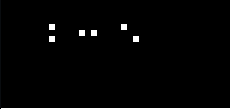
Sometimes, it can happens that number of 1 pixel defects scattered around closely. When the pixels are close enough it is better to consider as a 1 defects rather than separate defects.
To merge number of close pixels, we can use closing - dilation and erosion. This does add pixels between horizontal or vertical distanced pixels. But it doesn't fill the gap between diagonal distance. Refer below two images which shows original image and image after closing.
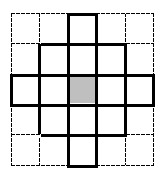
This is because the dilation is spreading to 8 neighbor pixels like below.
To fill a gap at a diagonal distanced pixels, the dilation should cover more as below.
This 2 pixel dilation code is as below.
To merge number of close pixels, we can use closing - dilation and erosion. This does add pixels between horizontal or vertical distanced pixels. But it doesn't fill the gap between diagonal distance. Refer below two images which shows original image and image after closing.
This is because the dilation is spreading to 8 neighbor pixels like below.
To fill a gap at a diagonal distanced pixels, the dilation should cover more as below.
This 2 pixel dilation code is as below.
__kernel
void Dilation2PixelDistance(
__global uchar *d_src,
__global uchar *d_dst,
int width, int height,
int roiLeft, int roiTop, int roiRight, int roiBottom )
{
int x = (roiLeft & (~0x07)) + ( get_global_id(0) << 3 );
int y = roiTop + get_global_id(1);
int stride = width >> 3;
if( x <= roiRight )
{
int idx = x + (y-2) * width;
int bidx = idx >> 3;
uchar dilated = 0, C;
if( y > roiTop+1 )
{
C = d_src[bidx];
dilated |= C;
}
bidx += stride;
if( y > roiTop )
{
C = d_src[bidx];
dilated |= C;
dilated |= (C >> 1) | ( d_src[bidx-1] << 7);
dilated |= (C << 1) | ( d_src[bidx+1] >> 7);
}
bidx += stride;
if( y <= roiBottom )
{
C = d_src[ bidx ];
dilated |= C;
dilated |= (C >> 2) | (d_src[ bidx - 1] << 6);
dilated |= (C >> 1) | (d_src[ bidx - 1] << 7);
dilated |= (C << 1) | (d_src[ bidx + 1] >> 7);
dilated |= (C << 2) | (d_src[ bidx + 1] >> 6);
}
bidx += stride;
if( y < roiBottom )
{
C = d_src[ bidx ];
dilated |= d_src[ bidx ];
dilated |= (C >> 1) | (d_src[ bidx - 1] << 7);
dilated |= (C << 1) | (d_src[ bidx + 1] >> 7);
}
bidx += stride;
if( y < roiBottom -1 )
{
C = d_src[bidx];
dilated |= C;
}
bidx -= (stride<<1);
if( y <= roiBottom )
{
d_dst[ bidx ] = dilated;
}
}
}
The closing operation - 2 pixel dilation & erosion - runs at 1.84 GB/s. Refer below profiling result.
Step 1 : start 0 ns, end 103840 ns, duration 103840 ns, 38243.76 MB/s : copying source image to device Step 2 : start 323584 ns, end 837440 ns, duration 513856 ns, 7728.30 MB/s : 2 pixel dilation Step 3 : start 1730560 ns, end 2041888 ns, duration 311328 ns, 12755.78 MB/s : erosion Step 4 : start 2072288 ns, end 2153088 ns, duration 80800 ns, 49148.92 MB/s : copying result image from device Total : duration 2153088 ns, 1844.44 MB/s
Saturday, June 15, 2013
OpenCL - Dilation and Erosion in packed bit
With packed binary pixel - 1 bit per pixel - morphology operation can be done with number of bits together. i.e. 8 pixels - 1 byte - can be read and dilated and eroded in a go.
When morphology is done in unit of byte, then the number of thread needs is pixel count divide by 8.
Below is a OpenCL kernel code that does dilation in 8 neighbor hood.
__kernel void Dilation(
__global uchar *d_src,
__global uchar *d_dst,
int width, int height,
int roiLeft, int roiTop, int roiRight, int roiBottom )
{
int x = (roiLeft & (~0x07)) + ( get_global_id(0) << 3 );
int y = roiTop + get_global_id(1);
int stride = width >> 3;
if( x <= roiRight )
{
int idx = x + (y-1) * width;
int bidx = idx >> 3;
uchar dilated = 0, C;
if( y > roiTop )
{
C = d_src[bidx];
dilated |= C; // North
dilated |= (C >> 1) | ( d_src[bidx-1] << 7); // North West
dilated |= (C << 1) | ( d_src[bidx+1] >> 7); // North East
}
bidx += stride;
if( y <= roiBottom )
{
C = d_src[ bidx ];
dilated |= C; // Center
dilated |= (C >> 1) | (d_src[ bidx - 1] << 7); // West
dilated |= (C << 1) | (d_src[ bidx + 1] >> 7); // East
}
bidx += stride;
if( y < roiBottom )
{
C = d_src[ bidx ];
dilated |= d_src[ bidx ]; // South
dilated |= (C >> 1) | (d_src[ bidx - 1] << 7); // South West
dilated |= (C << 1) | (d_src[ bidx + 1] >> 7); // South East
}
bidx -= stride;
if( y <= roiBottom )
{
d_dst[ bidx ] = dilated;
}
}
}
Below is a OpenCL kernel code that does erosion in 8 neighbor hood.
__kernel
void Erosion(
__global uchar *d_src,
__global uchar *d_dst,
int width, int height,
int roiLeft, int roiTop, int roiRight, int roiBottom )
{
int x = (roiLeft & (~0x07)) + ( get_global_id(0) << 3 );
int y = roiTop + get_global_id(1);
int stride = width >> 3;
if( x <= roiRight )
{
int idx = x + (y-1) * width;
int bidx = idx >> 3;
uchar eroded = 0xFF, C;
if( y > roiTop )
{
C = d_src[bidx];
eroded &= C;
eroded &= (C >> 1) | ( d_src[bidx-1] << 7);
eroded &= (C << 1) | ( d_src[bidx+1] >> 7);
}
bidx += stride;
if( y <= roiBottom )
{
C = d_src[ bidx ];
eroded &= C;
eroded &= (C >> 1) | (d_src[ bidx - 1] << 7);
eroded &= (C << 1) | (d_src[ bidx + 1] >> 7);
}
bidx += stride;
if( y < roiBottom )
{
C = d_src[ bidx ];
eroded &= d_src[ bidx ];
eroded &= (C >> 1) | (d_src[ bidx - 1] << 7);
eroded &= (C << 1) | (d_src[ bidx + 1] >> 7);
}
bidx -= stride;
if( y <= roiBottom )
{
d_dst[ bidx ] = eroded;
}
}
}
Thursday, May 9, 2013
LibPng with png++
To debug the inspection algorithm, the straight forward way is to look at the image. Though display image, there are lot of things to consider. Window, panning, zooming, display coordinates, display pixel value, bits per pixel, pixel aliasing, speed, ... . One simple way is to save the image to a file and then open with a off-the-shelf image viewer.
There are lots of image viewer and one is MeeSoft Image Analyzer. It supports lots of image format and displayed pixels are not anti-aliased.
There are also lots of image format. Though in here, I want wide-spread, loseless, support binary packed pixel and royalty-free image format. I choose PNG file format.
To manipulate PNG file format, there is LibPng for Windows. Also there is C++ wrapper project png++. To use LibPng, zlib is also needed for compression/decompression.
To setup, you need to download binaries and developer files from above link and extract it to some place. I extracted at 3rdParty folder.
Then modify the project's 'Additional Include Directories' with below directories. Prefixed "../" depends on the relative depth between project to the 3rdParty folder.
Then modify Library Directories with below path.
Then add '__Win32' to the Processor Definition. This is for png++ and without it, you will see below error.
There is one more step that needs attention on zlib. The zlib is trying to include unistd.h in Windows and there seems no other way but to comments the line out. Maybe I missed a step in the setup. Anyway with this line removed, it make the project compile and link though I don't know the implication. Refer below for the change.
There are lots of image viewer and one is MeeSoft Image Analyzer. It supports lots of image format and displayed pixels are not anti-aliased.
There are also lots of image format. Though in here, I want wide-spread, loseless, support binary packed pixel and royalty-free image format. I choose PNG file format.
To manipulate PNG file format, there is LibPng for Windows. Also there is C++ wrapper project png++. To use LibPng, zlib is also needed for compression/decompression.
To setup, you need to download binaries and developer files from above link and extract it to some place. I extracted at 3rdParty folder.
Then modify the project's 'Additional Include Directories' with below directories. Prefixed "../" depends on the relative depth between project to the 3rdParty folder.
"../../../3rdParty/libpng-1.2.37/include"; "../../../3rdParty/zlib-1.2.3/include"; "../../../3rdParty/png++-0.2.5";
Then modify Library Directories with below path.
"../../../3rdParty/libpng-1.2.37/lib"
Then add '__Win32' to the Processor Definition. This is for png++ and without it, you will see below error.
/3rdparty/png++-0.2.5/config.hpp(57) : fatal error C1189: #error : Byte-order could not be detected.
There is one more step that needs attention on zlib. The zlib is trying to include unistd.h in Windows and there seems no other way but to comments the line out. Maybe I missed a step in the setup. Anyway with this line removed, it make the project compile and link though I don't know the implication. Refer below for the change.
zconf.h at line 289 #if 1 /* HAVE_UNISTD_H -- this line is updated by ./configure */ # includeWhen the project is executed, it will look for the dlls for libpng and zlib. This can go to the system32 folder but in here I copied those file to the output folder using 'Post build event' as below./* for off_t */ //# include /* for SEEK_* and off_t */ // commented out ... #endif
xcopy "../../../3rdParty/libpng-1.2.37/bin/libpng12.dll" "$(TargetDir)" /Y xcopy "../../../3rdParty/zlib-1.2.3/bin/zlib1.dll" "$(TargetDir)" /YNow all set and code like below will save any image to png file.
#pragma warning( push, 3 )
#pragma warning( disable : 4996 4267 4355 ) // there are number warnings that may not be a problem at all ...
#include < png.hpp >
#pragma warning( pop )
#include "Image.hpp" // Image<> and BinaryImage<> are defined in here
#include < iostream >
#pragma comment(lib, "libpng.lib" )
// Most of this template class comes from png++ example.
template < typename TImage, typename PngPixelType >
class ImagePngWriter
: public png::generator < PngPixelType, ImagePngWriter < TImage,PngPixelType > >
{
public:
ImagePngWriter( TImage& image )
: png::generator < PngPixelType, ImagePngWriter > ( image.GetWidth(), image.GetHeight() ),
m_Image( image )
{}
png::byte* get_next_row(size_t pos)
{
return reinterpret_cast < png::byte* > ( m_Image.GetPixelPtr( 0, (int)pos ) );
}
void Write( const char *filename )
{
std::ofstream file( filename, std::ios::binary);
write(file);
}
private:
TImage& m_Image;
};
usgae
Image< boost::uint8_t > image( 640, 480 );
...
ImagePngWriter< Image< boost::uint8_t >, png::gray_pixel > pngWriter( image );
pngWriter.Write( "Gray.png" );
BinaryImage<> image( 640, 480 );
...
ImagePngWriter< BinaryImage<>, png::gray_pixel_1 > pngWriter( image );
pngWriter.Write( "Binary.png" );
Subscribe to:
Posts (Atom)